Canva vs Envato workflow guide: the strongest setup is not a winner
The Canva vs Envato question is usually framed like a fight: which tool should you choose? That framing is tidy, but it is not how real content work happens.
Most creators, freelancers, and small-business owners do not need one perfect tool. They need a repeatable way to turn ideas into usable content every week without rebuilding the same layouts from zero. Canva can be excellent for fast editing. An Envato-style asset library can be excellent for sourcing reusable creative parts. The strongest setup is often a workflow, not a winner.
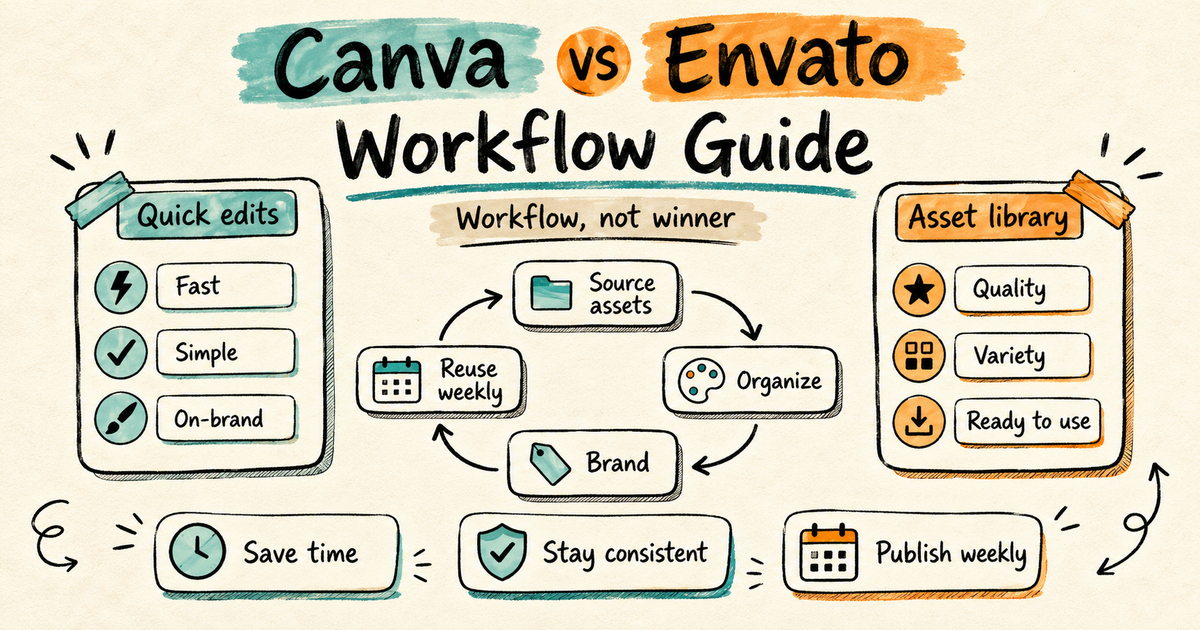
The wrong question: which tool wins?
Canva and an Envato-style asset workflow overlap in some places, but they solve different jobs. Canva is a creation workspace. It helps you open a design, change text, swap colors, drop in images, and export quickly. That is valuable when speed matters more than deep production control.
Envato-style workflow is different. The value is not only one template. It is having a library of source assets: video templates, graphics, fonts, presentation layouts, mockups, stock footage, music, sound effects, icons, and design parts you can pull into many tools. You still need a place to edit. The library gives you more raw material to build from.
So the useful question is not "Canva or Envato?" It is "What part of my content process is slowing me down?" If the bottleneck is quick assembly, Canva may be enough. If the bottleneck is finding fresh, reusable source material across formats, an asset-library workflow can save more time.
When Canva is enough
Canva is the right center of gravity when the work is simple, frequent, and mostly static. Think social graphics, lightweight presentations, quote cards, simple lead magnets, event flyers, story posts, and quick promo images. If your brand system is already clear and you mostly need to swap copy and photos, a browser-based editor keeps the process short.
- You publish basic posts and do not need much motion, audio, or advanced editing.
- You work with non-designers who need one familiar place to make small changes.
- Your content uses the same few layouts every week.
- You care more about fast approval than custom production depth.
For a local service business, that may be the whole job. A dentist can post a hygiene tip. A cafe can announce a new seasonal drink. A coach can share a short client reminder. If the content looks clean, matches the brand, and ships on time, there is no need to add a heavier workflow.
When an Envato-style asset workflow saves more time
Asset libraries become more useful when your content has more formats, more clients, or more moving parts. The moment you need video intros, Reels templates, slide decks, PDF layouts, website graphics, mockups, background music, stock clips, or icon systems, the work stops being one design file. It becomes production.
This is where a reusable source library can make the week easier. You are not searching from scratch every time. You collect a small set of proven assets by content type, adapt them to your brand, and reuse the structure with fresh topics. The template becomes a system, not a one-off download.
- A freelancer can keep separate folders for client proposals, social promos, logo reveals, and case-study graphics.
- A creator can keep a repeatable video pack for hooks, lower thirds, end screens, and thumbnail layouts.
- A small business can build a monthly campaign kit with matching graphics, motion pieces, and presentation assets.
- A lean team can test several directions without paying a designer to create every visual element from a blank page.
The key is restraint. Unlimited assets do not help if you download everything. A working library is small enough to use. You want a few strong templates per content type, clear folders, and notes about where each asset fits.
A simple weekly workflow
Start with the content types you repeat. For many creators and small businesses, that list is short: one educational post, one promotional post, one social video, one email graphic, and one sales or presentation asset. Do not build a giant library for content you do not publish.
Then assign a source asset to each repeatable job. A carousel layout can support weekly tips. A short-form video template can support product highlights. A presentation template can support client calls. A mockup can support offer announcements. The point is to remove the blank-page decision before the week starts.
- Pick source assets by content type, not by what looks exciting in the moment.
- Organize them in plain folders: social, video, presentation, lead magnet, website, client delivery.
- Adapt each asset once: colors, fonts, logo placement, image style, export sizes.
- Save a clean master version before making campaign-specific edits.
- Reuse the structure weekly with new copy, new examples, and fresh supporting images.
Canva can still sit inside this workflow. For example, you might source a background, icon set, or presentation layout from an asset library, then assemble the fast version in Canva for a client or team member to review. For motion or advanced files, you might edit in After Effects, Premiere Pro, Figma, PowerPoint, or another tool. The workflow decides the tool, not the other way around.
The practical decision rule
Choose Canva-first when your main need is speed inside one easy editor. Choose an asset-library-first workflow when your main need is broader source material across many content formats. Use both when Canva handles assembly, but you keep running out of strong creative parts to assemble.
A good test is the next four weeks. If you can name every asset you need and Canva already has enough for the job, keep it simple. If every week starts with a new hunt for templates, icons, footage, music, mockups, or slide layouts, build a reusable source library instead.
That is the real advantage: less deciding, less hunting, less rebuilding. The best system is not the one with the most tools. It is the one that lets you publish useful work on a normal week, with a process you can repeat.